 Hubwald
The shared hub for how your family actually runs.
One calendar, one grocery list, one place for the au pair's or babysitter's schedule, the kids' doctors, and figuring out what's for dinner Friday. Bilingual from day one, private to your family, and built for the way real households actually run — not a generic project-management tool repurposed for home life.
Try it free for 14 days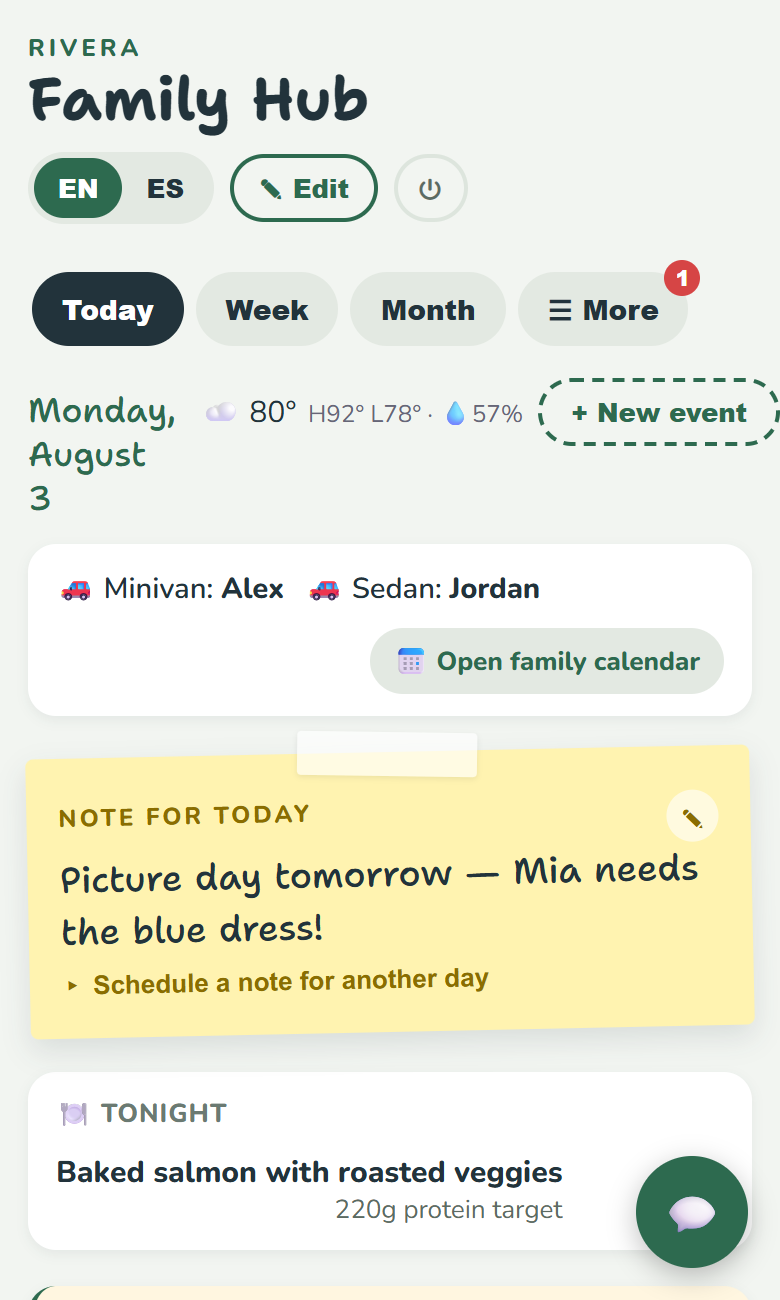
What is Hubwald?
Hubwald is a private, invite-only web app built for one household at a time — your family, and whoever helps run it day to day, whether that's a co-parent, an au pair, or a regular babysitter. It merges your family's real Google Calendar with everything a calendar alone doesn't cover: cars, recurring household routines, shared contacts, meal planning, a running grocery list, kids' medical and reference info, and au pair or childcare scheduling.
Everything in Hubwald is bilingual by default — pick any second language when you set up your household, and every piece of text you enter gets its own field in both languages, with the whole app switching languages with a single tap. It was built for families working across English and Spanish with a live-in au pair, but works just as well for any two-language household.
Hubwald installs to your phone's home screen like a native app (no app store required) and works offline with your household's last-synced data, so it's there even without a signal.
Everything your household needs, in one place
Not a generic calendar app with a family label slapped on it — every feature here was built around how households with a caregiver actually operate.
One merged calendar
Real Google Calendar events, household routines, and your au pair's or babysitter's schedule, all in one place instead of scattered across texts, sticky notes, and three different apps.
Bilingual by default
Pick any two languages when you set up your hub. Every note, contact, routine, and kid profile field gets its own translation, and the whole app switches with one tap.
Au pair & childcare scheduling
A dedicated weekly schedule for caregivers, with hour targets and time-off checks. Toggle "Au Pair mode" for official J-1 program rule warnings, or "Childcare mode" for a nanny or babysitter with no legal hour limits.
Kids' reference info, always current
Allergies, doctor, and insurance information kept in one place a substitute caregiver can actually find — not buried in a text thread from three months ago.
Meal planning & grocery lists
Plan the week's dinners together, with AI-assisted suggestions when nobody has an idea, and a shared grocery list that updates in real time.
Sitter Request — book a babysitter by text
Preload a roster of babysitters' phone numbers, post a one-off job (date, time, pay, notes), and Hubwald texts your selected sitters directly. They reply yes, no, or to discuss — you pick who to confirm, right from the app.
Simple, transparent pricing
Every new household gets full access to try Hubwald — no card, no limits. Subscribe to keep it after your trial ends.
14-Day Trial
- The entire app, unlocked — every feature below
- Unlimited kid profiles
- Sitter Request (SMS babysitter booking)
- Full shared calendar & household routines
- Contacts, meal planning, grocery list
- Au pair / childcare scheduling
- Bilingual interface
Starts automatically the moment you create your household. No payment info required to begin.
Family
- Monthly $12/mo
- Every 6 months $11/mo
- Annual $10/mo
- Keeps everything you used in the trial
- Unlimited kid profiles
- Sitter Request (SMS babysitter booking)
- Cancel anytime from the Billing Portal
Each interval also starts with its own 7-day free trial when you subscribe (card required, billing starts automatically after unless you cancel first).
Who Hubwald is for
Questions
Is my family's data private?
Yes. Hubwald is invite-only — there's no public directory or shared data between families. Every family's information is isolated at the database level, not just hidden in the interface. See the Privacy Policy for the full details.
Do I need a code from my agency to sign up?
No — you can create your own household directly, no code required. If a placement agency gave you a signup code, you can still enter it during setup, but it's entirely optional.
What's the difference between Au Pair mode and Childcare mode?
Au Pair mode adds scheduling warnings based on the official J-1 au pair program's rules (daily and weekly hour limits, required time off). Childcare mode turns those off for families working with a nanny or babysitter instead, who aren't bound by those same federal rules. Either way, it's just a heads-up — Hubwald never blocks you from saving the schedule you actually need.
How does Sitter Request work?
You preload a babysitter's name and phone number, and once they text back to confirm they're willing to receive job requests, you can post a one-off job — date, time, pay, and any notes — and Hubwald texts them directly. They reply to accept, decline, or ask to discuss, and you confirm whoever you'd like right from the app. It's included in your trial, and part of the Family plan after that.
Can I cancel anytime?
Yes, anytime, from the Billing Portal in the app's Family tab. Canceling stops future billing; your family's data stays safe and your kids' allergy, doctor, and emergency info stays visible, but the rest of the app locks until you resubscribe.
Is this only for families with an au pair?
No — Hubwald works just as well for a family with no live-in caregiver at all, or one working with a nanny or babysitter instead. The au pair-specific features are there if you need them, and easy to ignore if you don't.
Ready to get your household organized?
Create your family's hub in a couple of minutes — no credit card needed to start.
Get started free